


What Is a PoE Camera: Everything You Need to Know
Security cameras have evolved far beyond basic analog systems with grainy footage and complicated wiring. Today, PoE security camera systems are widely used in homes, businesses, and large enterprises because they simplify installation, improve reliability, and support modern features like high-resolution video and remote monitoring.
If you’ve ever asked "what is PoE camera?", how PoE cameras work, or whether a PoE camera system is better than Wi-Fi or analog cameras, this guide explains everything in detail, from core technology to real-world use cases and setup considerations.
Introduction to PoE Cameras
PoE security cameras are a modern solution for anyone seeking a reliable and efficient way to monitor their property. Unlike traditional security cameras that require separate cables for power and data, PoE cameras use Power over Ethernet technology to receive power and transmit video footage through a single Ethernet cable. This streamlined approach not only simplifies installation but also reduces overall costs and minimizes cable clutter. With PoE cameras, users benefit from high-quality video footage, the ability to access remote viewing from anywhere, and advanced features such as motion detection and instant alerts. By leveraging power over ethernet, these security cameras ensure a stable connection and consistent performance, making them an ideal choice for both home and business security needs.
PoE Camera Meaning
So what does PoE camera mean? A PoE camera, short for Power over Ethernet camera, is a type of IP security camera that receives power and transmits video data using a single Ethernet cable. Instead of relying on separate power cables and data lines, PoE cameras combine power and data transmission into one streamlined connection.

PoE cameras are a subset of IP cameras, meaning they use Internet Protocol to send video footage over an internet or LAN network. IP cameras work by processing video internally and transmitting it digitally over the internet, allowing for remote access and integration with network-based recording systems. While all PoE cameras are IP cameras, not all IP cameras support PoE, which is an important distinction when planning an effective PoE camera system. Standard IP cameras require separate power and data cables, whereas PoE cameras simplify installation by using a single Ethernet cable for both.
Compared to analog camera installation, which requires separate power supplies and coaxial cables, IP camera installation is generally easier and more integrated, making it a preferred choice for modern security setups.
PoE technology is widely used in modern security infrastructure because it reduces clutter, lowers installation costs, and improves reliability compared to traditional power-wired cameras.
How Power over Ethernet Works
Power over Ethernet (PoE) allows Ethernet cables to carry low-voltage electrical power alongside digital data. These computer networking cables, typically Cat5e or Cat6, were originally designed only for data transmission, but PoE standards now allow them to safely supply power to compatible devices.

In a PoE setup, power originates from a PoE switch, PoE-enabled network switch, or a PoE injector. That power travels through Ethernet cables to connected devices, such as PoE IP cameras, access points, or other network hardware.
This approach eliminates the need for:
-
Separate power adapters
-
Separate power supply lines
-
Electrical outlets near installed cameras
Instead, a single cable handles both power and data, simplifying installation and maintenance processes across the entire camera system.
How PoE Cameras Work in a Security Camera System
To understand how PoE cameras work, it helps to look at the full workflow:

-
Video capture - PoE cameras capture video footage using digital image sensors, often with features like night vision or wide dynamic range.
-
Internal video processing - Unlike analog cameras, PoE cameras process and encode video data internally before transmission.
-
Power and data transmission - The camera receives power and sends video data over the same Ethernet cable.
-
Network storage and management - Video is sent to network video recorders (NVRs) or other mass storage devices on the local network.
-
Remote viewing and monitoring - Users can view live or recorded footage on a secure smart device, computer, or monitor using a hardwired internet connection or secure Wi-Fi connection. When using WiFi cameras, it is crucial to maintain a secure WiFi connection to protect footage from potential cyber threats and interference.
Because PoE cameras rely on wired network connections, they offer more consistent performance than Wi-Fi cameras, especially in environments with multiple cameras operating simultaneously.
PoE Cameras vs Analog Cameras
Traditional analog cameras operate very differently from PoE security cameras.
Analog Camera Limitations

-
Require two separate cables: coaxial cables for video and separate power cables
-
Depend on a digital video recorder (DVR) for video processing
-
Experience signal degradation over long cable runs
-
Limited video quality compared to modern IP security cameras
-
Difficult to scale beyond a few installed cameras
Advantages of PoE Cameras
PoE cameras offer several improvements over analog systems:
-
Digital video quality with higher camera resolutions
-
No signal loss over long Ethernet runs
-
Easier scalability using network connections
-
Centralized management through a network switch or NVR
-
Cleaner installations without separate power adapters
As a result, PoE cameras have largely replaced analog cameras in modern security systems.
PoE Cameras vs Wi-Fi Cameras
Many users compare PoE cameras with WiFi cameras when designing a security camera installation.
In contrast to PoE cameras, WiFi cameras require an individual power supply, while PoE cameras receive both power and data through a single Ethernet cable.
-
Susceptible to interference: Wi-Fi cameras can be susceptible to interference and are generally considered more vulnerable to cyber attacks compared to PoE cameras.
Wi-Fi Camera Considerations

The Nest Cam (Battery) is a popular choice for homeowners who like the flexibility of installing it virtually anywhere in the house. Image courtesy of CNET
Wi-Fi cameras transmit video data wirelessly and usually require a separate power supply. While they are convenient for small setups, they have limitations:
-
Susceptible to interference
-
Dependent on wireless signal strength
-
Less reliable for multiple cameras
-
Higher risk of connection drops
Why PoE Cameras Are More Reliable
PoE cameras use a hardwired internet connection, which offers:
-
Stable data transmission
-
Better video quality
-
Lower latency
-
Improved cybersecurity
-
Consistent performance across large camera systems
For large or mission-critical installations, PoE cameras offer significantly better reliability than Wi-Fi cameras.
Key Benefits of PoE Security Camera Systems
PoE security camera systems are popular because they simplify installation while improving reliability and performance. By delivering power and data through a single Ethernet cable, PoE cameras reduce wiring complexity, lower installation costs, and provide a more stable connection than wireless alternatives. These benefits make PoE systems ideal for both small residential setups and large-scale security deployments.
Simplified Installation

PoE cameras receive power and transmit data through a single Ethernet cable, eliminating separate cables and reducing complexity during installation.
Lower Installation Costs
Without the need for separate power cables or certified electricians, PoE camera installations can reduce labor costs by up to 40% compared to traditional power-wired cameras.
Flexible Camera Placement
Because PoE cameras don’t need nearby electrical outlets, they can be installed in locations that are otherwise difficult to reach, such as ceilings, hallways, or building perimeters.
Centralized Power Management
PoE systems allow all cameras to draw power from one source. By connecting the PoE switch to an uninterruptible power source (UPS), the entire camera system can remain operational during power outages.
Higher Video Quality
PoE cameras offer superior video quality compared to analog cameras, supporting HD, 4K, and higher camera resolutions for clearer evidence and better situational awareness.
Easier Maintenance
With fewer components (no separate power adapters or split wiring) PoE cameras simplify ongoing installation and maintenance processes. Many systems can also be monitored using Simple Network Management Protocol (SNMP).
Easy Scalability
Adding multiple cameras is straightforward. You simply connect PoE cameras to additional network ports without rewiring the entire security infrastructure.
Types of PoE Cameras
PoE cameras come in several types, each designed for specific surveillance needs and environments. Understanding the differences between dome, bullet, PTZ, and multi-sensor PoE cameras helps you choose the right camera for coverage, visibility, and control. Selecting the correct type ensures better performance, clearer video footage, and a more effective security camera system overall.
Dome Cameras

Dome cameras offer a wide field of view and are commonly used indoors. They are ideal for offices, retail spaces, and open areas but may require regular cleaning.
Bullet Cameras

Bullet cameras are designed for long-distance viewing and are commonly used for access points, hallways, and outdoor perimeters.
PTZ PoE Cameras

PTZ PoE cameras (pan tilt zoom) allow operators to remotely adjust camera direction and zoom levels, making them ideal for large spaces that require active monitoring.
Multi-Sensor Cameras
Multi-sensor PoE cameras use multiple lenses to cover wide areas and reduce blind spots, often replacing several fixed cameras.
Core Components of an Effective PoE Camera System
An effective PoE camera system typically includes:

A Cat6 Ethernet cable
-
PoE IP cameras
-
Ethernet cables (Cat5e or Cat6)
-
A PoE switch or PoE-enabled network switch
-
Network video recorders (NVRs)
-
Mass storage devices
-
A local network or LAN connection
-
Remote viewing software or apps
Common Uses of PoE Camera Systems
PoE camera systems are versatile and widely adopted across many environments, offering reliable, scalable security solutions. Common use cases include:
-
Commercial offices and warehouses: Monitor entrances, exits, loading docks, and large open areas to deter theft and enhance employee safety.
-
Educational institutions: Secure hallways, parking lots, entrances, and playgrounds to support campus-wide safety and monitoring.
-
Residential properties: Keep an eye on front doors, driveways, backyards, and side yards for added peace of mind at home.
-
Restricted or sensitive areas: Monitor server rooms, storage areas, or equipment zones that require controlled access.
-
Integrated security setups: Seamlessly connect with access control and alarm systems to create a unified, comprehensive property protection solution.
Setting Up a PoE Camera System
A typical PoE setup involves:
-
Planning camera placement
-
Running Ethernet cables to each camera
-
Connecting cameras to a PoE switch or NVR
-
Powering the system through a centralized power supply
-
Configuring network and remote monitoring access
PoE extenders can be used to exceed Ethernet distance limits when needed.
Key Considerations for PoE Camera Systems
When planning a PoE camera system, it’s important to evaluate several factors to ensure you get the most effective setup for your needs. Key considerations include:
-
Camera count and coverage areas: Determine how many cameras you need and which areas require monitoring to ensure complete coverage.
-
Camera types: Choose the right mix of dome, bullet, or PTZ cameras based on mounting location, field of view, and monitoring flexibility.
-
PoE switch capacity and scalability: Select a PoE switch that can supply sufficient power to all cameras and allows room for future expansion.
-
Video quality and storage: Higher-resolution footage and continuous recording require more storage, so plan capacity accordingly.
-
Remote viewing and access: Ensure the system supports remote monitoring so you can view live or recorded footage from anywhere.
-
System compatibility and integration: Confirm the cameras can integrate smoothly with existing security systems, such as access control or alarms.
By considering these elements, you can build a PoE camera system that delivers reliable performance, high-quality video, and seamless remote access.
PoE for Battery Cameras: A Hybrid Solution
Not all security cameras are designed for traditional PoE connections. Battery-powered cameras typically rely on Wi-Fi for data transmission and cannot accept Ethernet data directly. However, PoE can still be used to provide power in hybrid setups.
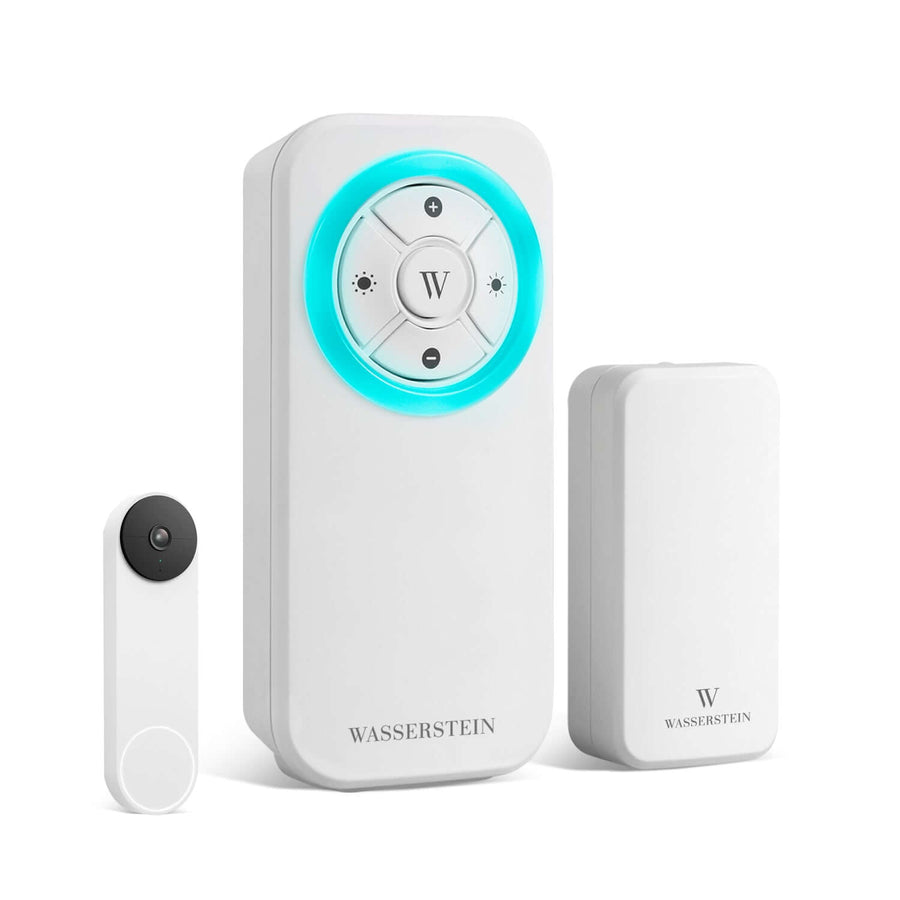
Wasserstein PoE Adapter for Google Nest Cam (Battery)
The Wasserstein PoE Adapter for Google Nest Cam (Battery) is designed for users who already have Ethernet cables installed throughout their home or property.

Key advantages include:
-
Supplies continuous PoE power to Google Nest Cam (Battery)
-
Wi-Fi is still used to transmit video data
-
Simple setup using a pogo cable and RJ45 LAN cable
-
LED indicator confirms power delivery
-
Durable, weatherproof cable for outdoor use
-
Made for Google certified for seamless compatibility
-
Compact design ideal for clean indoor or outdoor installations
This solution allows users to eliminate frequent battery recharging while keeping their existing Nest camera ecosystem intact.
Recording and Storage Options
PoE camera systems support multiple recording options:
-
Local recording via NVRs
-
Cloud-based storage
-
Continuous recording
-
Motion-triggered recording
-
Scheduled recording
Storage requirements depend on video quality, camera resolutions, and the number of installed cameras.
Integrating PoE Cameras with Other Security Systems
Modern PoE cameras can integrate with:
-
Access control systems
-
Alarm systems
-
Video analytics software
-
Remote monitoring platforms
These integrations help create a comprehensive security infrastructure with automated alerts and advanced analytics.
Maintenance and Troubleshooting
To maintain performance:
-
Inspect Ethernet cables and connectors
-
Clean camera lenses
-
Monitor power usage and network load
-
Check NVR and storage health
PoE systems are generally easier to maintain than systems with separate power supplies.
Final Thoughts
PoE security camera systems offer a powerful combination of reliability, scalability, and simplicity. By using a single cable for power and data, PoE cameras reduce installation costs, improve video quality, and support modern security needs. Whether you’re installing a full PoE camera system or enhancing battery cameras with PoE adapters, PoE technology provides a flexible and future-proof security solution (learn more about how to power outdoor security cameras).
Frequently Asked Questions (FAQs)
What is PoE security camera?
A PoE camera is an IP security camera that receives power and transmits video data using a single Ethernet cable, eliminating the need for separate power cables.
Are PoE cameras better than Wi-Fi cameras?
PoE cameras offer greater reliability, better video quality, and more stable data transmission than Wi-Fi cameras, especially in large installations.
Do PoE cameras need internet access?
PoE cameras can operate on a local network without internet access, but an internet connection is required for remote viewing.
Can PoE cameras work during power outages?
Yes. When connected to an uninterruptible power source, PoE cameras can continue operating during power outages.
What is the difference between an NVR and a DVR?
An NVR works with IP cameras and processes digital video data, while a DVR works with analog cameras and coaxial cables.
Can battery cameras use PoE?
Battery cameras cannot use Ethernet for data but can receive continuous power using PoE adapters like the Wasserstein PoE Adapter for Google Nest Cam.
What Ethernet cable is best for PoE cameras?
Cat5e and Cat6 Ethernet cables are commonly used for PoE camera installations.
How many cameras can a PoE switch support?
This depends on the switch’s power budget and the power requirements of each camera.
Leave a comment